From Chatbots to Do-bots: The 2026 Shift
If you're still asking AI to just write emails, you're falling behind. Here is how to hire AI "Agents" to handle the grunt work, plus 3 roles you can automate today without writing code.

If you spent 2025 asking ChatGPT to "write a polite email to a difficult client," you were playing with toys.
Don't get me wrong, it was a cool toy. It saved you some brain power. It helped you phrase things diplomatically when you really wanted to tell a vendor to go kick rocks. But let’s look at the actual workflow involved in that interaction:
- You opened ChatGPT.
- You typed a prompt explaining the situation.
- You waited for the text.
- You copied the text.
- You opened your email client.
- You pasted the text.
- You realized ChatGPT left a placeholder like "[INSERT DATE HERE]."
- You found the date and fixed it.
- You hit send.
That isn't automation. That is just typing with extra steps. You were using Artificial Intelligence as a glorified spell-checker.
That stops this year.
In 2026, the Technology Hat isn't about writing better prompts. It's about hiring Agents.
The biggest shift in small business tech right now is the move from "Chatbots" (which talk) to "Agentic AI" (which does). If your AI strategy is still just a browser tab where you ask questions, you are already falling behind.
Today, we are going deep. We are going to talk about what an Agent actually is, the three specific roles you can hire for today, the terrifying risks of giving a robot your credit card, and exactly how to build your first digital employee without writing a single line of code.
Grab a coffee. We have work to automate.
Part 1: The Theory (Library vs. Intern)
To understand why this shift matters, you have to understand the fundamental limitation of the Large Language Models (LLMs) we’ve been using for the last few years.
Think of Standard GenAI (ChatGPT, Claude, Gemini) as a Public Library.
It contains nearly all of human knowledge. It is brilliant. You can walk into the library, ask the librarian (the AI) how to calculate the depreciation on a 2024 Ford F-150, and it will give you the exact formula and a perfectly written explanation.
But the librarian cannot leave the building. The librarian cannot walk out to your truck, check the odometer, file the paperwork with the DMV, or mail a check to the state. The library is a place of information, not action.
AI Agents are Interns.
An Agent is what happens when you give that librarian a laptop, an email address, and a terrifying amount of permission to click buttons on your behalf.
An Agent operates on a loop that looks like this:
- Trigger: "Hey, a new invoice just arrived in Gmail."
- Thought: "I need to read this, extract the amount, and match it to a Purchase Order in QuickBooks."
- Tool Use: The Agent logs into QuickBooks (using a tool you gave it) and searches for the PO.
- Observation: "I found the PO, but the amounts don't match."
- Action: The Agent drafts an email to the vendor asking for a correction.
See the difference?
- The Chatbot: "Here is a draft of an email you could send to the vendor."
- The Agent: "I noticed the discrepancy, emailed the vendor, and flagged the invoice as 'Disputed' in your accounting software. You don't need to do anything."
One is a tool you use. The other is a worker you manage.
Part 2: The "Tech Stack" (What You Actually Need)
"Josh, this sounds expensive. I am not buying an enterprise server rack." You don't need a server rack. The beauty of 2026 is that the "Agent Layer" has finally become accessible to normal people who don't know Python.
Here are the three categories of tools you’ll see in the wild:
1. The "All-in-One" Platforms (Best for Beginners)
These are platforms specifically designed to let you build agents with drag-and-drop interfaces.
- Zapier Central: This is my top recommendation for HatStacked readers. If you already use Zapier to move data from A to B, "Central" is the brain that sits in the middle. You can talk to it like a chatbot, but it has access to all your Zaps.
- Gumloop: A visual builder that looks like a flowchart. Great for complex scraping tasks (like "Go to these 50 websites and find the CEO's email").
2. The "Native" Ecosystems (Best for Power Users)
- OpenAI GPTs (with Actions): You can build a custom GPT and give it API keys to talk to outside software. It’s powerful, but setting up the "Actions" (the API connections) can be a headache if you don't know what a JSON file is.
- Microsoft Co-Pilot Studio: If your whole business runs on Office 365, this is the native way to make an agent that lives inside Excel and Outlook.
3. The "Wild West" (Best for Nerds)
- AutoGPT / BabyAGI: These are open-source projects that run on your local machine. They are powerful, chaotic, and prone to breaking. Unless you enjoy debugging code at 2 AM, stay away for now.
For the rest of this post, we are going to assume you are using something user-friendly like Zapier Central or a specific specialized tool.
Part 3: Three Agents You Can Hire Right Now
Enough theory. Let’s talk about specific jobs.
I am not talking about "brainstorming blog posts." I am talking about the boring, soul-sucking operational drag that keeps you working until 8 PM.
Here are three roles to fill immediately.
Role #1: The Gatekeeper (Customer Service Level 1)
The Problem:
You are the bottleneck. A customer emails at 7:30 PM on a Friday asking, "Does this widget fit a 2022 Honda Civic?"
You are at dinner. You don't see the email until Saturday morning. By then, the customer has already bought the part from Amazon because they needed an answer now.
Or, worse, they ask "Where is my order?" and you have to stop what you’re doing, log into Shopify, copy the tracking number, and reply.
The Solution: The Gatekeeper Agent.
Tools like Intercom Fin, Lindy.ai, or even a custom Zapier Central bot hooked up to Gmail.
The Workflow:
- Ingest: The Agent reads every incoming support email.
- RAG (Retrieval-Augmented Generation): This is a fancy term for "Looking stuff up." The Agent searches your PDF manuals, your FAQ page, and your past email history.
- Tool Access: The Agent checks your inventory system (see my post on Mastering Inventory Counts).
- Decision:
- Scenario A (Easy): "Does this fit a Honda?" -> Agent checks the 'Compatibility' field in the product database. -> Agent replies: "Yes, it fits the 2022 model! Here is a link to the installation guide."
- Scenario B (Hard): "My product arrived broken and I hate you." -> Agent recognizes negative sentiment -> Agent replies: "I am so sorry to hear that. I have looped in Josh (the owner) to handle this personally." -> Agent tags you in Slack.
The Hat Benefit:
You stop being a glorified search bar. You only talk to customers when there is a real problem, not just a data lookup question.
Role #2: The Grunt (The Lead Qualification Machine)
The Problem:
You have a "Contact Us" form on your site. You get 10 submissions a day.
- 3 are spam bots selling SEO services.
- 4 are people with $0 budget asking for free advice.
- 3 are actual, high-value leads.
Currently, you treat them all the same. You read them all. You waste time replying to the tire-kickers.
The Solution: The Grunt.
This is a background process that runs 24/7.
The Workflow:
- Trigger: New Typeform/Gravity Forms submission.
- Research: The Agent takes the email domain (e.g.,
@scalesplus.com) and scrapes the web. It looks at LinkedIn. It looks at the company website. - Qualification Logic: You give the Agent a rubric.
- "If company size < 5 employees, tag as 'Low Priority'."
- "If industry = 'Manufacturing' AND location = 'Michigan', tag as 'VIP'."
- Action:
- Low Priority: Agent sends a polite, pre-written templated email pointing them to your pricing page.
- VIP: Agent adds them to your CRM (HubSpot/Pipedrive), creates a "Deal," and sends a push notification to your phone saying: "Call this guy NOW."
The Hat Benefit:
You stop chasing ghosts. Your sales time is spent solely on people who can actually pay you.
Role #3: The Researcher (The Supply Chain Spy)
The Problem:
You need to buy new shelving for the warehouse. Or you need to find a new supplier for cardboard boxes because your current one raised prices by 20%.
This implies spending 4 hours on Google, opening 50 tabs, trying to find a "Request Quote" button on a website that hasn't been updated since 2013.
The Solution: The Researcher.
Tools like Perplexity, OpenAI Operator, or AutoGPT.
The Workflow:
You give the Agent a mission statement:
"Find me 10 packaging suppliers in the Midwest that specialize in corrugated cardboard. For each one, find their phone number, general email address, and any mention of 'Minimum Order Quantity' on their site. Compile this into a Google Sheet."
The Agent:
- Executes multiple search queries ("Cardboard suppliers Ohio," "Packaging companies Michigan").
- Visits the websites.
- Navigates to the "About" and "Contact" pages.
- Scrapes the data.
- Formats it.
- Pastes it into the Google Sheet.
The Hat Benefit:
You get your afternoon back. Instead of spending 4 hours searching, you spend 15 minutes reviewing the list and making the calls.
Part 4: The Safety Hat (Risks & Guardrails)
Okay, put the excitement aside for a second. Put on the Safety Hat.
We are talking about giving a robot the ability to send emails and modify data. What could possibly go wrong?
(Answer: Everything).
If you read my guide on Endpoint Protection, you know I'm paranoid about access control. The same rules apply here.
Here are the three rules for keeping your Agent from destroying your business.
Rule 1: No Financial Authority
Never, ever, ever give an autonomous agent the ability to spend money without a human click.
- Okay: Agent creates a Purchase Order in QuickBooks.
- Not Okay: Agent has the API key to Stripe and permission to execute transfers.
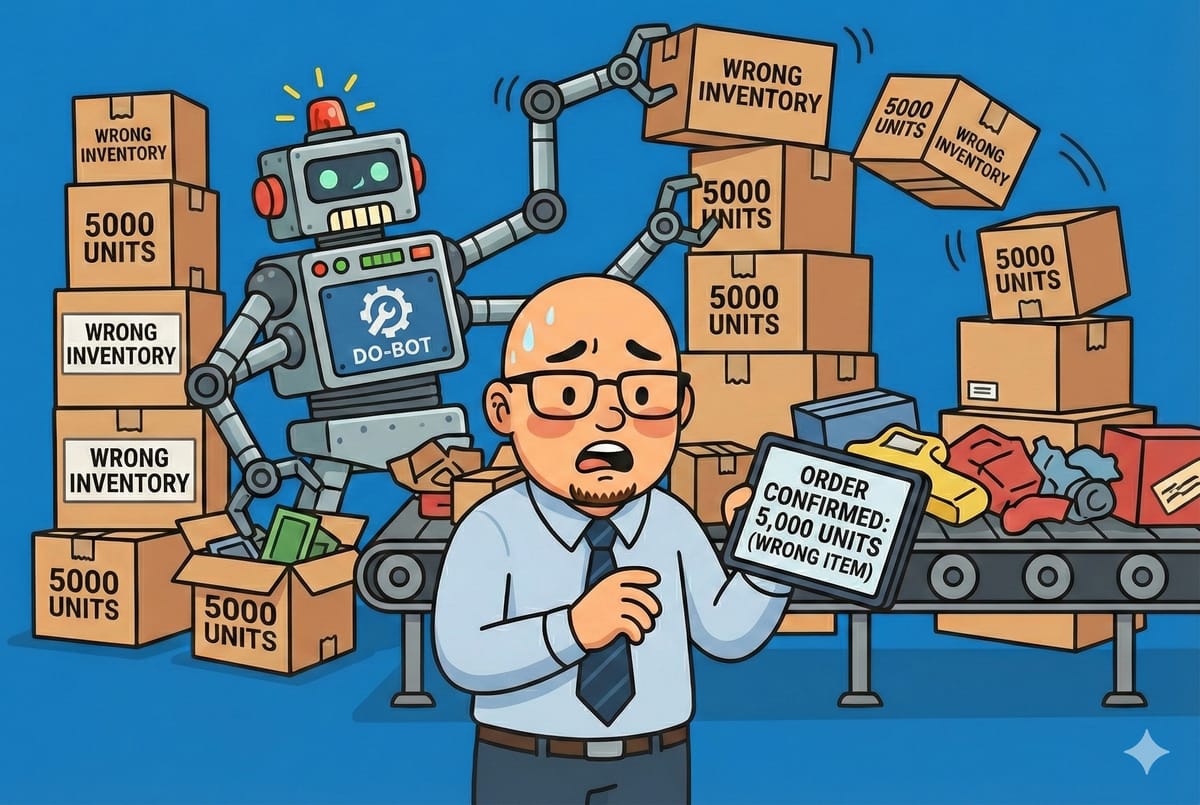
Agents can hallucinate. You do not want to wake up and find out your Agent bought 5,000 units of inventory because it misunderstood a decimal point in an email.
Rule 2: The "Draft" Mode Protocol
When you first launch an Agent (especially a customer-facing one), run it in "Draft Mode" for two weeks.
- Instead of sending the email to the client, have the Agent save it as a "Draft" in Gmail.
- You review the drafts. If they are good, you hit send.
- Once the Agent has nailed 50/50 correctly, then you give it the keys to the send button.
Rule 3: The Infinite Loop
Be careful when Agents talk to Agents.
- Your Agent emails a vendor.
- The vendor has an auto-responder.
- Your Agent thinks the auto-reply is a new message and replies "Thanks for the update."
- The vendor's auto-responder fires again.
- Result: You wake up to 4,000 emails and a suspended Gmail account.
- Fix: Program your Agent to ignore emails with "noreply," "automated," or "ticket closed" in the subject line.
Part 5: Step-by-Step Tutorial (Your First Agent)
Let’s build something right now. We are going to build a simple "Receipt Cop" agent using Zapier Central.
Goal: When you save a receipt to a Google Drive folder, the Agent reads it, extracts the total, and logs it in a Google Sheet.
Prerequisites:
- A Zapier account.
- A Google Drive account.
- A Google Sheet.
Step 1: Set the Stage
- Create a Google Sheet with columns:
Date,Vendor,Amount,Category. - Create a Google Drive folder named "To Process".
Step 2: Initialize the Agent
- Go to
central.zapier.com. - Click "New Bot". Name it "Receipt Cop."
- In the "Instructions" box (the Brain), type:
"You are an expense processing assistant. Your job is to monitor my Google Drive folder. When a new file is added, you act as a data entry clerk."
Step 3: Give it Tools (Behaviors)
- Click "Add Behavior".
- Select Google Drive -> New File in Folder.
- Select the "To Process" folder you created.
- Add another Behavior: Google Sheets -> Create Spreadsheet Row.
Step 4: The Logic
In the chat window with your bot, type this configuration:
"When a new file appears in 'To Process', I want you to read the text inside the image/PDF. Look for the Date, the Vendor Name, and the Total Dollar Amount. Then, add a new row to my Google Sheet with this data. If you are unsure about the category, mark it as 'Uncategorized'."
Step 5: Test It
- Upload a picture of a Starbucks receipt to the folder.
- Watch the chat window. The Agent should say: "I found a file. Processing... I detected 'Starbucks', date 'Jan 12', amount '$6.45'. Added to sheet."
- Check your Sheet.
Boom. You just hired an employee that works for free (mostly) and never sleeps.
The Golden Rule: Don't Build "God"
I will leave you with one final piece of advice.
The biggest mistake I see smart people make is trying to build One Robot To Rule Them All. They want an AI that handles email, orders inventory, posts on Instagram, and walks the dog.
When you try to build a "General Manager" agent, it fails. It gets confused. It tries to apply Instagram logic to your accounting software.
Build Specialists.
- Build a "Receipt Processor."
- Build a "Meeting Scheduler."
- Build a "Refund Handler."
Keep their instructions narrow. Keep their tool access limited. A team of 5 dumb, specialized agents is infinitely more powerful than one "smart" agent that tries to do everything.
The Conclusion
The "Technology Hat" used to be about hardware. It was about making sure the printer worked and the Wi-Fi reached the warehouse.
Then it was about software—picking the right CRM or ERP.
Now, in 2026, the Technology Hat is about Labor Management.
But instead of managing humans with emotions and sick days, you are managing scripts and APIs.
Digital labor is cheap, fast, and infinitely scalable. But it requires a leader. It requires someone to set the strategy, build the guardrails, and audit the work.
That someone is you.
Stop chatting with the library. Hire the intern. And for the love of god, check the drafts before you let it email your biggest client.
Get to work.
More from the Technology Hat: